

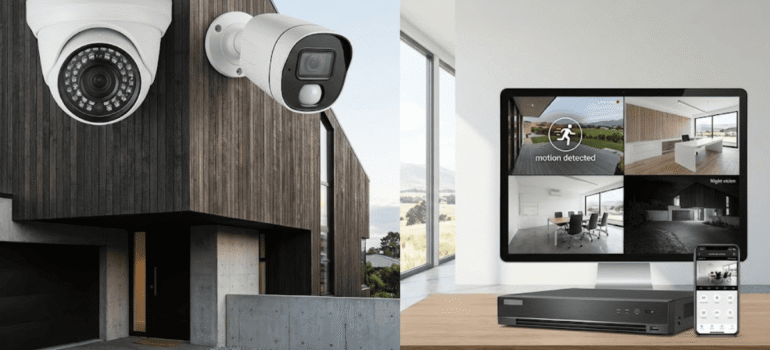
CCTV Buying Guide: Features to Look for in Modern Security Systems
Introduction
Buying a CCTV system today isn’t as simple as picking a camera and mounting it on a wall. With so many options available — different resolutions, storage types, night vision technologies, and mobile access features — it’s easy to feel overwhelmed. That’s exactly why a clear CCTV buying guide matters.
Whether you’re securing a home, office, warehouse, or construction site, the right features make the difference between a system that simply records footage and one that actually protects your property. This guide breaks down the most important features to look for, explained in plain terms, so you can make a confident, practical decision.
Why Choosing the Right CCTV Features Matters
A poorly chosen CCTV system can create a false sense of security. Low image quality, limited storage, or unreliable access often become obvious only after an incident occurs.
A well-planned CCTV buying guide helps you:
-
Capture clear, usable footage
-
Monitor activity in real time
-
Store recordings safely
-
Access cameras remotely
-
Integrate security into daily operations
The goal isn’t to buy the most expensive system — it’s to buy the right one.
Core Features Every CCTV System Should Have
1. Camera Resolution: Clarity Comes First
Resolution determines how clear your footage will be. This is one of the most important decisions in any CCTV buying guide.
Common Resolution Options
-
720p (HD): Basic monitoring, limited detail
-
1080p (Full HD): Good clarity for homes and offices
-
2K / 4MP: Enhanced detail for entrances and walkways
-
4K / 8MP: High-detail coverage for large or high-risk areas
For most homes and small businesses, 1080p or 2K provides the best balance between clarity and storage usage. Warehouses or sites with long viewing distances benefit from higher resolutions.
Professional CCTV Installation Auckland services can recommend the right resolution based on camera placement and coverage needs.
2. Night Vision: Seeing Clearly After Dark
Criminal activity doesn’t stop at sunset, which makes night vision essential.
Types of Night Vision
-
Infrared (IR): Black-and-white images in complete darkness
-
ColorVu / Low-Light Color: Full-colour footage with minimal lighting
-
Spotlight-Assisted Vision: Uses built-in LEDs for colour night recording
For outdoor areas, night vision performance becomes even more important. If cameras are mounted near external walls or roofs, checking structural integrity through Roofing Auckland NZ inspections helps prevent moisture damage to cabling or fixtures.
3. Storage Options: Where Your Footage Lives
Storage determines how long footage is kept and how easily it can be accessed.
Common Storage Types
-
Local DVR/NVR: Records footage on-site
-
Cloud Storage: Access recordings from anywhere
-
Hybrid Storage: Combines local and cloud backup
Local storage avoids monthly fees but can be damaged or stolen. Cloud storage offers flexibility but depends on internet reliability.
In commercial environments where electrical reliability matters, routine safety checks like Test and Tag ensure recording equipment stays compliant and operational.
4. Remote Access and Mobile Monitoring
One of the biggest expectations today is being able to view cameras remotely.
What to Look For
-
Mobile apps (Android & iOS)
-
Live viewing
-
Playback access
-
Push notifications for motion detection
Remote access allows homeowners and business owners to stay connected no matter where they are.
To ensure stable connections and safe power supply, outlet placement and wiring should be handled by a licensed Electrician Auckland NZ.
Advanced Features Worth Considering
5. Motion Detection and Alerts
Motion detection turns passive cameras into active security tools.
Smart Motion Features
-
Human detection
-
Zone-based alerts
-
Reduced false alarms
-
Custom notification schedules
This is especially useful in offices, warehouses, or areas near entrances.
6. Audio Recording and Two-Way Talk
Some systems offer built-in microphones and speakers.
Best Uses
-
Front door communication
-
Staff interaction
-
Deterrence warnings
Be mindful of privacy laws when using audio recording, particularly in workplaces.
7. Weather Resistance for Outdoor Cameras
Outdoor cameras must handle rain, dust, and temperature changes.
What to Check
-
IP66 or IP67 rating
-
UV-resistant casing
-
Sealed cable connections
Outdoor installations near boundaries often pair well with physical security upgrades like Fencing Auckland or Fencing New Zealand for layered protection.
CCTV Features for Different Environments
Homes
Homeowners typically prioritise:
-
Ease of use
-
Remote access
-
Smart alerts
-
Clean installation
CCTV upgrades are often combined with interior projects such as Kitchen Renovation or layout changes, where minimal disruption is preferred.
Offices
Office environments benefit from:
-
Centralised monitoring
-
Clear entry/exit coverage
-
Long-term storage
-
Compliance documentation
Electrical and network infrastructure should be reviewed by professionals, especially when adding multiple cameras.
Warehouses and Sites
High-risk environments require:
-
High-resolution cameras
-
Wide-angle lenses
-
Reliable storage
-
Night vision
Sites offering plumbing, construction, or renovation services may already be working with Plumbing Services in Auckland — coordinating CCTV installation alongside other trades reduces disruption and improves safety.
Common Mistakes When Buying CCTV Systems
Even with a good CCTV buying guide, buyers often make these mistakes:
-
Choosing low resolution to save money
-
Ignoring night vision performance
-
Underestimating storage needs
-
Assuming Wi-Fi is always reliable
-
Skipping professional installation
Working with an experienced provider like Rani Construction helps design systems that suit real-world conditions rather than showroom promises.
How to Choose the Right CCTV System Step by Step
-
Identify areas you need to monitor
-
Decide indoor vs outdoor cameras
-
Choose appropriate resolution
-
Select storage type
-
Confirm remote access features
-
Arrange professional installation
This structured approach ensures no key feature is overlooked.
Conclusion
A well-chosen CCTV system is built on clarity, not complexity. By following a practical CCTV buying guide, homeowners and businesses can focus on features that truly matter — resolution, night vision, reliable storage, and remote access.
The best systems don’t just record footage; they provide awareness, deterrence, and peace of mind. And with professional planning and installation, CCTV becomes a long-term security asset rather than a short-term fix.
📣 Stay Connected with RANI CONSTRUCTION
Looking to secure your property with expert CCTV, electrical, plumbing, or renovation services?
Follow Rani Construction for insights, real-world projects, and professional guidance:
👉 Facebook: https://www.facebook.com/raniconstructionltd.nz
👉 Instagram: https://www.instagram.com/rani.construction.nz
Let’s create beautiful, functional spaces together.
In Case You Missed These Posts: